 PHASE 1
 When a performance diagnostic marks a website with a Grade F, the fault does not lie with network providers or user smartphones. The responsibility falls directly on the web developer and business owner who published an unoptimized digital asset.
A 3.5 MB page size might render instantly on a developer's high-speed office fiber, but for a mobile visitor on a metered 3G or 4G data plan, every bloated megabyte consumes real money out of their mobile bundle. If your site forces users to wait almost 7 seconds while burning data on uncompressed assets, they will simply bounce.
What Does a Grade A+ Performance Target Look Like?
To understand what optimization achieves in practice, look at the audit benchmark for www.phase1pixels.ng. By trimming non-essential page weight, lazy loading assets, and serving lean WebP graphics, the platform delivers near-instant load times and minimal mobile data consumption for visitors:
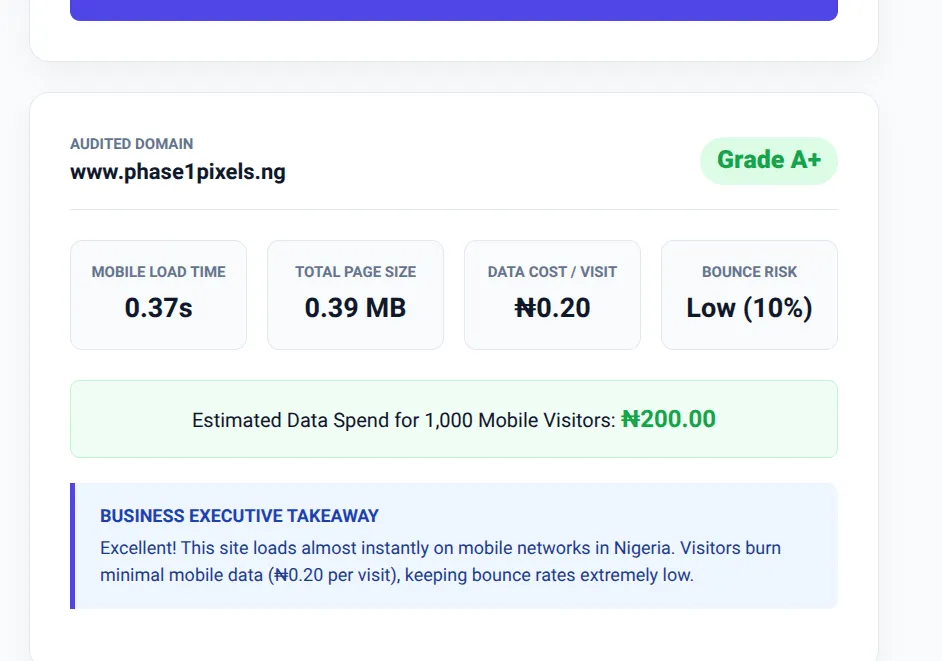
The Benchmark Standard: Grade A+ result on www.phase1pixels.ng featuring a 0.37s load time, 0.39 MB payload, and a low 10% bounce risk.
Comparing a Grade F load (6.99s, 3.5 MB) to a Grade A+ target (0.37s, 0.39 MB) highlights the dramatic drop in resource waste. Standard optimization strategies, such as those recommended in Google's Core Web Vitals documentation, consistently emphasize payload reduction as a core metric for user experience.
Step 1: Modernize and Next-Gen Compress All Media Assets
Images often account for up to 70% of total page weight. Serving raw JPEGs or PNGs without compression forces mobile browsers to download massive files. Convert all site graphics to modern WebP or AVIF formats and serve responsive sizes based on device screen size.
Step 2: Defer Non-Critical JavaScript and Third-Party Trackers
Analytics scripts, live chat widgets, and social media pixels frequently block the browser thread during initial page render. Audit your head tags and apply defer or async attributes so core page content loads before scripts execute.
Step 3: Enable Server-Side Compression (Gzip or Brotli)
If your web server sends raw text, CSS, and JS files over the network without compression, you are wasting valuable bandwidth. Ensure Gzip or Brotli compression is enabled in your server configuration (e.g., via .htaccess or nginx configurations).
Step 4: Implement Native Lazy Loading for Below-the-Fold Content
A user opening your homepage should only download assets visible in their immediate browser viewport. Add native loading="lazy" attributes to all images and embedded iFrames below the fold to stop unnecessary data consumption during initial load.
Building on WordPress, Shopify, or Joomla?
If you manage your website through a content management system (CMS) rather than custom code, you can resolve Grade F page weights using turnkey automation plugins:
- WordPress Image Optimization: Install plugins like Smush, ShortPixel, or Imagify to automatically convert uploaded images to WebP and compress them on upload.
- WordPress Caching & Script Deferral: Use WP Rocket, LiteSpeed Cache, or Autoptimize to minify CSS/JS files and delay non-critical scripts automatically.
- Shopify Storefronts: Use apps like Crush.pics or TinyIMG to compress catalog images, and audit installed Shopify Apps to remove inactive third-party script tags.
The Business Impact of Payload Engineering
Optimizing your website payload is not just about vanity scores or technical benchmarks. Cutting your page size from 3.5 MB down to under 800 KB directly lowers visitor bounce rates, improves search engine indexing, and respects your mobile audience's cellular data.
"Fast, lightweight websites are a baseline requirement for modern user retention. Web developers who optimize for mobile constraints build better user experiences and drive higher business conversions."
Re-Test Your Website Performance Today
Run your domain through Phase1 SpeedIndex to verify your optimizations, measure reduced data costs per visit, and check your updated speed grade.
Run New Audit